Streaming That Doesn't Stream: Fixing Suspense Waterfalls in Next.js
Streaming SSR is one of those features teams believe they've adopted because the primitives are present. There's a loading.tsx! There are <Suspense> boundaries! And yet the page still white-screens for 2.8 seconds and then pops in all at once — which means, functionally, nothing is streaming at all.
Point 1: sequential awaits — the classic waterfall
The page component read like a checklist, which is exactly the problem:
export default async function QuoteReviewPage({ params }: Props) {
  const { quoteId } = await params;
  const profile = await getApplicantProfile(quoteId);   // 180ms
  const vehicle = await getVehicleRecords(quoteId);     // 340ms
  const coverage = await getCoverageOptions(quoteId);   // 210ms
  const pricing = await getPricing(quoteId);            // 1400ms 💀
  // total: sequential sum, ~2.1s of pure waiting
  return ( /* ... */ );
}
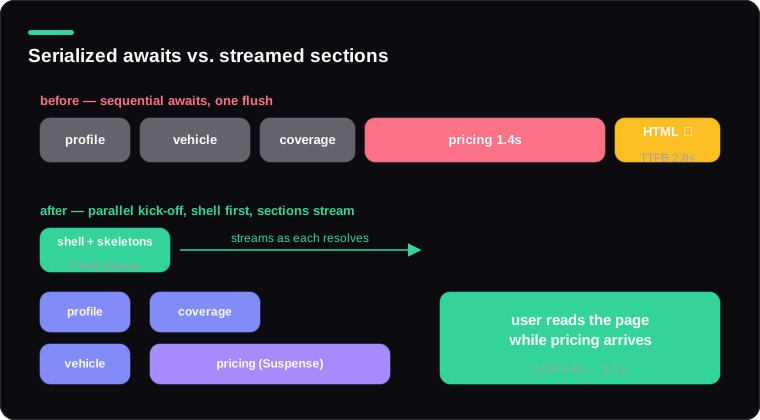
Each await blocks the next call from even starting. None of these depended on each other's results — they all keyed off quoteId. The two-tier fix: parallelize what the shell truly needs, and don't await what it doesn't.
export default async function QuoteReviewPage({ params }: Props) {
  const { quoteId } = await params;

  // Shell needs these: start together, await together
  const [profile, vehicle, coverage] = await Promise.all([
    getApplicantProfile(quoteId),
    getVehicleRecords(quoteId),
    getCoverageOptions(quoteId),
  ]);

  // Shell does NOT need pricing: start it, hand the promise down
  const pricingPromise = getPricing(quoteId);

  return (
    <QuoteShell profile={profile} vehicle={vehicle} coverage={coverage}>
      <Suspense fallback={<PricingSkeleton />}>
        <PricingPanel pricing={pricingPromise} />
      </Suspense>
    </QuoteShell>
  );
}
// PricingPanel.tsx
import { use } from "react";

export function PricingPanel({ pricing }: { pricing: Promise<Pricing> }) {
  const result = use(pricing); // suspends HERE, inside the boundary
  return <PremiumBreakdown result={result} />;
}
The kick-off-early-suspend-late move is the heart of streaming: the fetch starts in the page, but the waiting happens inside a Suspense boundary, so the shell flushes immediately and pricing streams in ~1.4s later, into a page the user is already reading.
Point 2: the all-or-nothing loading.tsx
The route had a loading.tsx — a full-page spinner. loading.tsx wraps the entire route segment in one Suspense boundary. With every fetch above it, the flow became: spinner → 2.1s of nothing changing → entire page replaces spinner in one pop. Technically streaming (two chunks!), experientially a loading screen.
Route-level loading.tsx is a reasonable floor. The actual streaming design lives in nested boundaries sized to content sections — shell instantly, each panel independently:
<QuoteShell profile={profile}>
  <Suspense fallback={<VehicleSkeleton />}>
    <VehiclePanel quoteId={quoteId} />
  </Suspense>
  <Suspense fallback={<PricingSkeleton />}>
    <PricingPanel pricing={pricingPromise} />
  </Suspense>
  <Suspense fallback={null}>
    <SimilarPolicies quoteId={quoteId} /> {/* nice-to-have: no skeleton, just appears */}
  </Suspense>
</QuoteShell>
Point 3: the blocker nobody sees — dynamic APIs and middleware
After the first two fixes, TTFB was still ~700ms. The remaining serialization wasn't in the page at all: a checkEntitlements() call in the layout awaited an auth service before any HTML could flush — the layout wraps everything, so its awaits gate the whole stream. Same class of problem: hoist the check into a boundary (or push it down to the components that actually need entitlement data as a promise), keep the static frame flushing immediately.
Also on the invisible-blockers list, worth checking in any audit:
cookies()/headers()calls high in the tree — they force dynamic rendering and their position affects when work can start.- Heavy middleware — it runs before the route, so a 200ms middleware fetch is 200ms added to every TTFB, streaming or not.
- Blocking third-party tags in the root layout
<head>that delay first paint even when HTML streams beautifully.
Verifying you actually stream
Don't trust the framework — watch the wire. curl -N shows chunks as they arrive:
curl -N -s https://quotes.example.com/quote/Q-2291/review | \
  awk '{ print strftime("%S.%3N"), length($0) }' | head -20
You want an early burst (shell + skeletons), then later bursts as each boundary resolves. One burst after a long silence means you're still serialized somewhere. In the browser: Performance panel, look for multiple Receive Data chunks and progressively-decreasing content pop-in.
Final numbers for the quote page: TTFB 2.8s → 190ms; LCP 3.4s → 1.1s; and the pricing panel — the slowest, most-watched element — now loads into an interactive page instead of gating it.
The team's takeaway line went up on their wiki, and I'll steal it back for this post: Suspense boundaries are where you're allowed to be slow. Decide those places on purpose.